FlowerAura / Internal tool / 2024
Order batching
Customers could buy a cake and flowers in one order, but each product was prepared separately, so the order waited for its slowest item. With a product analyst, I designed batching, which lets vendors prepare whole orders.
- My role
- Senior UI/UX designer
- Worked with
- A product analyst
- Used by
- Vendors who prepare and ship orders
- When
- January 2024
- DecisionVendors work through batches
- DecisionA status on every batch
- ResearchSupport, vendor and delivery staff
- ResultLive, and still in use
Orders with more than one product were prepared in parts and matched by hand, so deliveries were delayed.
The vendor and support teams raised the problem, and my manager asked a product analyst and me to solve it.
The work in four steps.
One order, prepared in parts
Products were prepared by type, so the items in one order were ready at different times.
02Speaking to support, vendor and delivery staff
We spoke to the people who handled these orders and reviewed the whole module.
03Batches of whole orders
Vendors prepare a batch of complete orders, with a status on each batch and order.
04Still live, and reused in the cloud kitchens
Batching still runs. The same model was used in the cloud kitchens, and the company's own delivery system uses it.
One order, prepared in parts
Customers could buy products from different categories in one order, such as a cake and a bouquet. Each product was prepared separately, by product type, so the order could not ship until every item in it was ready.
A finished bouquet had to wait for the cake in the same order. Managing these waits took time, delayed deliveries and made the experience worse for customers. Vendors also matched order IDs by hand, which could lead to errors. Cakes and flowers can be returned only if a complaint is raised within a set window, so errors like these added to the cost of refunds and compensation.
Speaking to support, vendor and delivery staff
We spoke to support and vendor staff, and reviewed the whole module in the order management system.
We also asked some delivery staff how long they usually waited for an order with several products.
Batches of whole orders
The product analyst and I designed batching. Each vendor gets a batch of complete orders to prepare, and at the operations level we asked vendors to prepare by order instead of by product.
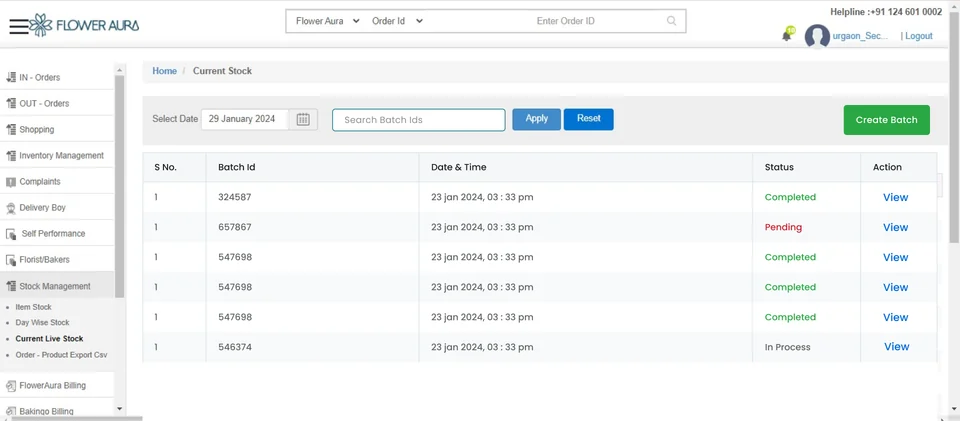
The batch list has a date picker, a search by batch ID and a Create Batch button, and shows each batch with its status. Opening a batch shows its orders, each with its own status, and orders not yet completed have a Remove link.
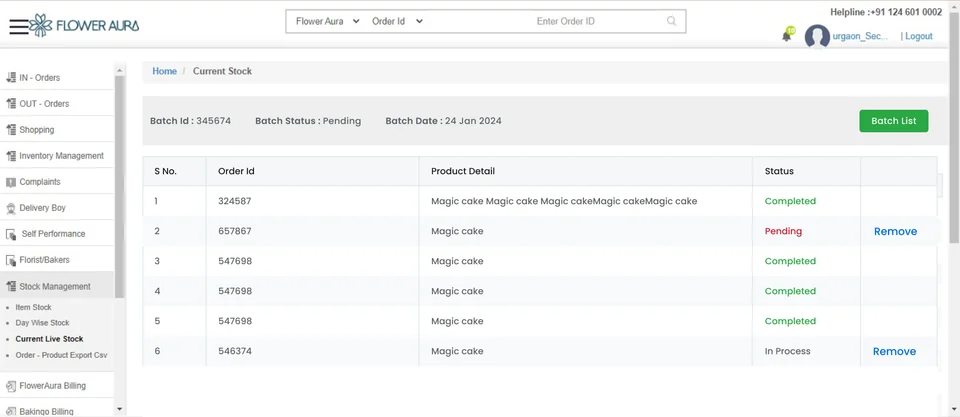
For each order, a pop-up lists its items, each with its own status, so a pending cake and completed flowers show side by side.

The screens keep the admin panel's plain layout, because the aim was to fix a problem crucial to the business.
Still live, and reused in the cloud kitchens
Batching went live and still runs. FlowerAura and Bakingo used the same model in their cloud kitchens to improve delivery times on Swiggy and Zomato, and their own delivery system uses it today.
Complete orders were ready sooner, and deliveries became more efficient.
I do not have figures for this change. The result above describes how operations ran after launch.
My part in this work. I designed the batching screens and worked out batching itself with a product analyst. The IDs and products on the screens are sample data.